
Nokia Maps v2.0.3204 S60v3 SOS9.1 Unsigned Crkd *FREE!!

See the world in a new way with Nokia Maps. With downloadable maps for more than 200 countries, and millions of points of interest to be discovered, there are treasures to be found and shared.
Explore…
You can find your destination and plan your route street by street, city to city. You can get a different perspective with satellite, hybrid, and street maps. And, you can enhance your visit with multimedia city guides.
Drive…
Get a clear view of the road ahead with Drive. World-class car navigation with turn-by-turn visual and voice guidance, plus added real-time traffic feeds and dynamic re-routing to help you arrive on time.
…or Walk
Innovative turn-by-turn pedestrian navigation, Walk is the shortcut to learning a new city on foot. With advanced multi-sensor positioning, you can cut corners like a local or hop on at clearly marked transport stops.
Let Nokia Maps show you the way.
Rapidshare
EASY SHARE MIRROR LINK:-
Source
Get Free Navigation Licence From Nokia
Nokia is offering Free Navigation Licence to experience the GPS Maps. Actually it is a one week trail licence, so it expires after one week. To get the license code go to the URL we specified bellow and just enter your mobile number,
Nokia sends the code to the registered mobile number by sms in minutes and the license code. We can active our maps with the license code but it expires after one week. It is helpful for the people who have no experience with the maps. Nokia is providing this service for free. Go and get your free license here.
Source
Nokia sends the code to the registered mobile number by sms in minutes and the license code. We can active our maps with the license code but it expires after one week. It is helpful for the people who have no experience with the maps. Nokia is providing this service for free. Go and get your free license here.
Source
Unlock HTC Diamond for free... Free unlock htc diamond
HTC Diamond Hard-SPL and SIM Unlocker
Requirements :
MicroSoft Activ Sync4.5
Compatiblity :Windows Xp Service Pack2,Windows Vista
Before U Proceed For Unlock ,Hard Reset Ur Htc Diamond
To perform a hard reset
1. Pull out the stylus.
2. With the device turned on, press and hold the VOLUME DOWN and
ENTER buttons, then press the RESET button with the stylus tip.
3. Release the RESET button, but continue pressing the VOLUME DOWN and ENTER buttons until you see this message on the screen:
4. Release the VOLUME DOWN and ENTER buttons, then press the
VOLUME UP button to perform the hard reset, or press any other
button to cancel the reset.
Clear Storage
You can also use Clear Storage to reset your device back to factory default settings and/or format the internal storage.
1. On the Home screen, slide to the Settings tab and then tap All
Settings.
2. On the System tab, tap Clear Storage.
3. In the drop-down menu, select whether to Clear Storage only,
Format internal storage only, or Clear storage and format internal storage.
4. Enter “1234” and then tap Yes.
Procedure
How to unlock HTC Diamond
After unzip you will find the three steps needed to unlock an HTC Diamond
1. Remove SIMCard and sync the phone with ActiveSync and leave it connected to the computer.
2. Go to the first folder. Step1 execute the file diamond-sspl.bat. Follow the steps that you will see firstly in the computer and then in the HTC
3. Now in the folder Step1 go to the folder HardSPL-1.24 y execute the file DiamondCustomRUU.exe. Follow the instructions and the Diamond will restart by itself.
4. Now we go to the Step2 folder execute the file DiamonCustomRUU.exe. After the process will finish the diamond will restart again.
5. Now in the folder Step3 we must copy the file DiamUnlock.exe in the inner data storage and execute from HTC. It will spash too fast to even see it. You must touch the screen and keep it pressed so you will be able to see the info. Now you must rapidly select Remove SIM Locks and then Commit Changes
6. HTC UNLOCKED!
SOURCE
Requirements :
MicroSoft Activ Sync4.5
Compatiblity :Windows Xp Service Pack2,Windows Vista
Before U Proceed For Unlock ,Hard Reset Ur Htc Diamond
To perform a hard reset
1. Pull out the stylus.
2. With the device turned on, press and hold the VOLUME DOWN and
ENTER buttons, then press the RESET button with the stylus tip.
3. Release the RESET button, but continue pressing the VOLUME DOWN and ENTER buttons until you see this message on the screen:
4. Release the VOLUME DOWN and ENTER buttons, then press the
VOLUME UP button to perform the hard reset, or press any other
button to cancel the reset.
Clear Storage
You can also use Clear Storage to reset your device back to factory default settings and/or format the internal storage.
1. On the Home screen, slide to the Settings tab and then tap All
Settings.
2. On the System tab, tap Clear Storage.
3. In the drop-down menu, select whether to Clear Storage only,
Format internal storage only, or Clear storage and format internal storage.
4. Enter “1234” and then tap Yes.
Procedure
How to unlock HTC Diamond
After unzip you will find the three steps needed to unlock an HTC Diamond
1. Remove SIMCard and sync the phone with ActiveSync and leave it connected to the computer.
2. Go to the first folder. Step1 execute the file diamond-sspl.bat. Follow the steps that you will see firstly in the computer and then in the HTC
3. Now in the folder Step1 go to the folder HardSPL-1.24 y execute the file DiamondCustomRUU.exe. Follow the instructions and the Diamond will restart by itself.
4. Now we go to the Step2 folder execute the file DiamonCustomRUU.exe. After the process will finish the diamond will restart again.
5. Now in the folder Step3 we must copy the file DiamUnlock.exe in the inner data storage and execute from HTC. It will spash too fast to even see it. You must touch the screen and keep it pressed so you will be able to see the info. Now you must rapidly select Remove SIM Locks and then Commit Changes
6. HTC UNLOCKED!
SOURCE
A complete guide to sim card cloning
** THIS IS FOR EDUCATIONAL PURPOSES ONLY... CHECK WHETHER ITS ILLEGAL IN YOUR COUNTRY TO DO SO...
This will not be a guide of what sim cloning is, but since I am using this very nice piece of Software for years now, I will try to introduce it to you.
Sim Cloning means creating a copy of the Original Sim-card. Some of you might ask, what are the benefits of making a clone of your original Sim Card:
-Can I use both cards at the same time, so that I can have two phones at different locations?
=No. You can ONLY have one card active otherwise your Netwoek provider would notice 2 copies of the same Number and might deactivate your account. You should also consider, that some logical conclusions are made by the Network Providers like this: You can’t be in France and few minutes later activate your Clone Card in Brazil. The Network Provider knows the Time that would be needed to travel from one place to the other one.
-If I have the original Simcard and the Clonecard active, would both telephones ring and can I receive SMS messages on both phones at the same time?
=No. Only one device would ring, more specificaly the telephone that replied first to the call by the Network. The same happens with the SMS’s.
-Can I have more numbers than one in the same phone at the same time?
= Yes and No, the “Simemu-card” can store up to 10 different phonenumbers. But,…they will not be active at the same time. Only one number is registered to the Network Provider. The switching between the different numbers is done through a smart menuitem in your phone.
-How do I write on my simcard the other 9 numbers?
=You can NOT use your original simcard and make changes on that card to support more numbers. Instead you need to find a “Programmable Card” and copy the Firmware of the “SIMEMU” on it. These ‘empty’ programmable cards are called “Silver card” or “Green card” according to their Processor (CPU) and the Memory Capacity.
-What do I need to make a clone of my original card?
=That is not quite easy any more since most of the Original Sim cards are made “Copy Proof”. This means that you are not able to read the necessary information out of them to use for your clone card. This procedure requires experiments with your Original Sim Card which might end into a destroyed Original Sim-Card. You will have to run a Software that will “brute force” the information out of your card, but the totally allowed read attempts are limited and will end up into a destroyed Card. Imagine the Hangman game with a Veeeery long word to guess
-Why would I want to make a clone of my card?
= There are many different opinions on that.
1) You can have a backup of your card in case you loose your phone
2) You can use the same Phonebook on all your numbers on the Sim in your cloned card.
3) You can have a spare phone in your car in case you would forget your phone at home. Just ask your wife, neighbor or dog to turn it off for you.
4) You can hide a second phone number from your wife without her knowledge
5) You can draw the attention of all your friends with new telephone devices although you appear with an old cheap one.
6) You can have different Network providers on the same clone *but only one will always be active.
7) You avoid destroying the contacs of your expensive phone due to card switching in case you need to change cards because you don’t want to carry your P910 to your job.
 You can ask your Brother, Dad or Friend to make a clone of a new card and send you the “Ki and IMSI” through E-mail or Telephone. You can enter this info into your phone by just typing it like a sms message.
there are many more reasons I can’t think of right now.
-Is the card cloning expensive?
= You will need some equipment for the programming of the clone and the reading of the original card. And you will need an empty Pic card (Green or Silver). The whole equipment should cost you less or more 40 Euro, Remember, never give away your simcard to somebody else to do this task since he will keep a copy of your simcard. The only info he will need to write down are few numbers.
Good luck and happy cloning
Softeware that Reads and Writes to any Operator Sim Phone Card. That can be used to backup Operator Sim Phone Card information like SMS/phone numbers and more. Use to back-up information to Txt or doc files. Reset card pin.
A_COMPLETE_GUIDE_TO_SIM_CLONING. (pdf file)
All the software needed for cloning and instructions on how to use software
http://rapidshare.com/files/112818011/Aii_SIM_EMU_6.01_CFG_v2.1.rar.html
Make a test Gsm test card
http://rapidshare.com/files/112818010/make-your_test_sim.zip.html
This will not be a guide of what sim cloning is, but since I am using this very nice piece of Software for years now, I will try to introduce it to you.
Sim Cloning means creating a copy of the Original Sim-card. Some of you might ask, what are the benefits of making a clone of your original Sim Card:
-Can I use both cards at the same time, so that I can have two phones at different locations?
=No. You can ONLY have one card active otherwise your Netwoek provider would notice 2 copies of the same Number and might deactivate your account. You should also consider, that some logical conclusions are made by the Network Providers like this: You can’t be in France and few minutes later activate your Clone Card in Brazil. The Network Provider knows the Time that would be needed to travel from one place to the other one.
-If I have the original Simcard and the Clonecard active, would both telephones ring and can I receive SMS messages on both phones at the same time?
=No. Only one device would ring, more specificaly the telephone that replied first to the call by the Network. The same happens with the SMS’s.
-Can I have more numbers than one in the same phone at the same time?
= Yes and No, the “Simemu-card” can store up to 10 different phonenumbers. But,…they will not be active at the same time. Only one number is registered to the Network Provider. The switching between the different numbers is done through a smart menuitem in your phone.
-How do I write on my simcard the other 9 numbers?
=You can NOT use your original simcard and make changes on that card to support more numbers. Instead you need to find a “Programmable Card” and copy the Firmware of the “SIMEMU” on it. These ‘empty’ programmable cards are called “Silver card” or “Green card” according to their Processor (CPU) and the Memory Capacity.
-What do I need to make a clone of my original card?
=That is not quite easy any more since most of the Original Sim cards are made “Copy Proof”. This means that you are not able to read the necessary information out of them to use for your clone card. This procedure requires experiments with your Original Sim Card which might end into a destroyed Original Sim-Card. You will have to run a Software that will “brute force” the information out of your card, but the totally allowed read attempts are limited and will end up into a destroyed Card. Imagine the Hangman game with a Veeeery long word to guess
-Why would I want to make a clone of my card?
= There are many different opinions on that.
1) You can have a backup of your card in case you loose your phone
2) You can use the same Phonebook on all your numbers on the Sim in your cloned card.
3) You can have a spare phone in your car in case you would forget your phone at home. Just ask your wife, neighbor or dog to turn it off for you.
4) You can hide a second phone number from your wife without her knowledge
5) You can draw the attention of all your friends with new telephone devices although you appear with an old cheap one.
6) You can have different Network providers on the same clone *but only one will always be active.
7) You avoid destroying the contacs of your expensive phone due to card switching in case you need to change cards because you don’t want to carry your P910 to your job.
You can ask your Brother, Dad or Friend to make a clone of a new card and send you the “Ki and IMSI” through E-mail or Telephone. You can enter this info into your phone by just typing it like a sms message.there are many more reasons I can’t think of right now.
-Is the card cloning expensive?
= You will need some equipment for the programming of the clone and the reading of the original card. And you will need an empty Pic card (Green or Silver). The whole equipment should cost you less or more 40 Euro, Remember, never give away your simcard to somebody else to do this task since he will keep a copy of your simcard. The only info he will need to write down are few numbers.
Good luck and happy cloning
Softeware that Reads and Writes to any Operator Sim Phone Card. That can be used to backup Operator Sim Phone Card information like SMS/phone numbers and more. Use to back-up information to Txt or doc files. Reset card pin.
A_COMPLETE_GUIDE_TO_SIM_CLONING. (pdf file)
All the software needed for cloning and instructions on how to use software
http://rapidshare.com/files/112818011/Aii_SIM_EMU_6.01_CFG_v2.1.rar.html
Make a test Gsm test card
http://rapidshare.com/files/112818010/make-your_test_sim.zip.html
Hologram Checker – Is your Nokia Battery original?

Angle the hologram. To the left, right, bottom, and top of the logo, you should see one, two, three, and four dots respectively.
Check the logo:
Look at the hologram label. You should see the Nokia connecting hands symbol from one angle and the Nokia Original Enhancements logo from another angle.
now check ur battery is it original
Update the firmware on: Nokia e50, e51, e60, e61, e62, e65, e70, e90, n70, n71, n72, n73, n76, n77, n78, n80, n81, n82, n90, n91, n92, n93, n95, n96, 5310,
Manually updating N81 and other Nokia mobiles firmware
Tuesday, October 14th, 2008
Product CodesModel Product code Version
Nokia E50 0530669 (RM-170) 07.36.0.0
Nokia E51 0553974 (RM-244) 100.34.20
Nokia E60 0519047 (RM-49) 3.0633.09.04
Nokia E61 0530093 (RM-89) 3.0633.09.04
Nokia E61i 0545785 (RM-227) 3.0633.69.00
Nokia E62(1)
Nokia E65 0536850 (RM-208) 3.0633.69.00
Nokia E70 0526646 (RM-10)
3.0633.09.04
Nokia E90 Communicator
Tastiera italiana 0544403 (RA-6) 210.34.75
Nokia E90 Communicator
Tastiera inglese 0548314 (RA-6) 210.34.75
Nokia E90 Communicator
Tastiera tedesca 0544355 (RA-6) 210.34.75
Nokia E90 Communicator
Tastiera francese 0548316 (RA-6) 210.34.75
Nokia N70 0522157 (RM-84)
5.0705.3.0.1
Nokia N70 ME 0536418 (RM-84) 5.0705.3.0.1
Nokia N71 0521298 (RM-67) 4.0642.1.05
Nokia N72 0534977 (RM-180)
5.0706.4.0.1
Nokia N73 0529790 (RM-133) 4.0812.4.0.1
Nokia N73 ME 0537289 (RM-133) 4.0812.4.2.1
Nokia N76 0534107 (RM-135) 31.0.014
Nokia N77
Nokia N78 0545485 (RM-235) 12.046
Nokia N80 0529381 (RM-92) 5.0719.0.2(2)
Nokia N80 IE 0538301 (RM-92) 5.0719.0.2
Nokia N81 0558072 (RM-223) 20.0.056
Nokia N81 8GB 0544169 (RM-179) 11.0.045
Nokia N82 0549174 (RM-313) 30.0.019
Nokia N90 0522145 (RM-42) 5.0607.7.3
Nokia N91 0523183 (RM-43) 2.20.008
Nokia N91 8GB 0538601 (RM-43) 3.10.023
Nokia N92 0531111 (RM-100) 5.0748.2.0.4
Nokia N93 0523601 (RM-55) 20.0.058
Nokia N93i 0532063 (RM-156) 30.0.013
Nokia N95 0534841 (RM-159) 30.0.015
Nokia N95 8GB 0549487 (RM-320) 30.0.018
Nokia N96 0543713 (RM-247) 11.018
Nokia 3109 classic 0547344 (RM-274) 07.00
Nokia 3110 classic 0544307 (RM-237) 07.01
Nokia 3120 classic 0559059 (RM-364) 07.16
Nokia 3250 0526389 (RM-38) V 03.24
Nokia 3500 classic 0549098 (RM-272) 07.00
Nokia 5200 0535355 (RM-174)
05.53
Nokia 5220 XpressMusic 0563406 (RM-411)
04.86
Nokia 5300 XpressMusic 0532161 (RM-146)
07.00
Nokia 5310 XpressMusic 0546968 (RM-303) 08.32
Nokia 5500 Sport 0523963 (RM-86) 04.60
Nokia 5610 XpressMusic 0552281 (RM-242) 06.60
Nokia 5700 XpressMusi 0544728 (RM-230) 03.83.1
Nokia 6085 0539080 (RM-198)
06.00
Nokia 6086 0515500 (RM-188) 06.00
Nokia 6110 Navigator 0546581 (RM-122) 04.22
Nokia 6120 classic 0541799 (RM-243) 05.11
Nokia 6125 0531480 (RM-178) 05.43
Nokia 6126
Nokia 6131 0528733 (RM-115) v6.10
Nokia 6136
Nokia 6151 0534661 (RM-200) 04.10
Nokia 6210 Navigator 0557240 (RM-367) 03.08
Nokia 6212 classic
Nokia 6220 classic 0549325 (RM-328) 03.23
Nokia 6233 0535974 (RM-145)
05.60
Nokia 6234 0532099 (RM-123) 05.60
Nokia 6267 0547080 (RM-210) 05.20
Nokia 6270 0532431 (RM-56) V 03.81
Nokia 6288 0539837 (RM-78) 06.43
Nokia 6290 0532821 (RM-176) 03.03
Nokia 6300 0537620 (RM-217) 06.60
Nokia 6301
Nokia 6500 classic 0546101 (RM-265) 06.61
Nokia 6500 slide 0549717 (RM-240) 08.30
Nokia 6600 fold 0558724 (RM-325) 04.80
Nokia 6600 slide 0565181 (RM-414) 04.81
Nokia 6630 0518120 (RM-1) 6.03.40
Nokia 6650 fold
Nokia 6680 0521689 (RM-36) 5.04.40
Nokia 6681 0521906 (RM-57) 6.09.00
Nokia 6682
Nokia 7210 Supernova 0564805 (RM436) 04.87
Nokia 7370 0532440 (RM-70) V 04.13
Nokia 7373 0540787 (RM-209) 05.50
Nokia 7390 0534714 (RM-140) V 03.84
Nokia 7500 Prism 0515161 (RM-249) 03.50
Nokia 7610 Supernova
Nokia 7900 Prism 0549053 (RM-264) 04.84
Nokia 8600 Luna 0548200 (RM-164) 03.52
Nokia 8800 Arte 0547866 (RM-233) 06.40
NSu reads the product codes of your phone and it searches its database
for a newer version of the corresponding firmware in order to upgrade it.
This is why you will need to change the product code of your phone into a
non-branded product code, before running NSU.
Download the « NSS » software in order to change the phone’s product code.
This is a shareware program that you can download on the site of its author here :
And finally, download NSU here: NSU.
1. NOW WE CAN BEGIN:
Install NSS (Install as a Virtual USB)
Install NSU
Connect your phone and wait for Windows to install the drivers.
Open NSS and click on “Scan for new device” on the right-upper part of the window
Click on the icon « Phone info »
Click on “Scan”
Now you can change the product code (on the right of the « phone info »
window of NSS). And then mark the case “Enable”.
Now press “Write”, and your phone’s product code will be changed
(you might think that nothing happened, because the phone is still in normal mode,
and the changing of the product code only takes a couple of seconds, but don’t worry,
the product code changed !).
Close NSS and you can proceed now with the NSU flashing.
When the flashing with NSU is over, start-up your phone and you’ll have the pleasant
surprise that your phone’s firmware is the latest Nokia firmware to date!
NOTE: I was advised to disable any antivirus and firewall on your PC during the flashing,but didn’t effect me with them being on.
2. Step
1. If you have been using “Phoenix” application on your desktop ever – uninstall it first.
2. Uninstall via “Add/remove programs” all cable drivers – ‘Nokia Connectivity Cable Driver’, ‘Nokia flashing cable driver’, ‘Nokia service tool driver’ (it’s possible that you don’t have the last one)
3. Download:
http://rapidshare.com/files/13251252…DMA_.part1.rar AND http://rapidshare.com/files/13251555…DMA_.part2.rar
4. If you don’t have Microsoft.NET Framework 2.0 installed – install it from package which you downloaded at point #3 5. Install “Nokia Care Suite” but don’t run it after installation – uncheck checkbox ‘Run now’ at the end of installation
6. Install “Nokia CDMA Mobile Device” which is also included in the package from #3
7. Be sure you have set in your phone ORIGINAL product code
8. Now you must download offline package containing the firmware you want to dowload.
if you can’t find firmware package with your language anywhere, you can try to go on without using offline upgrade – the program downloads packages automatically from internet but I’m not sure, that with the newest version – check it on yourself. But at first – spend some time with google and I’m sure every localisation of v20 is available somewhere!
9. Install package. It installs files in “c:Program filesNokiaPhoenix” as default so run Nokia Care Suite after firmware extraction and set in program options a correct path to firmware – so: “c:Program filesNokiaPhoenixProducts” – set it up correctly – check if Care Suite detects new firmware
10. Program is easy, I think – just update firmware and that’s it – even all settings,data,apps are preserved
 It’s similar to NSU but works better.
Source
 Phoenix2008Patched.exe
All Repair / Unlocking Box Setup
CRUISER
Cruiser Setup v13.20
Cruiser Firmware Restore v1.10
CruiserSuite 1.16 Installer
SE Ultimate Unlocker v4.01
S1 Flasher Unlocker v2.05
SE A2 Flasher v1.11
SE PDA Flasher v1.07
CPF-BOX II
CPF Box II Main Setup 2008.08.07
CPF Box II Update 2009.09.15
CPF DONGLE
CPF Dongle Setup 2009.09.15
CYCLONE BOX
Cyclone Box Main Installer
Cyclone Box Update 11.09.2009
DREAM BOX
Dream Box Setup 3.20
ET-BOX
ET-Box Setup 1.86
EASY UNLOCKER
Easy Unlocker Box Installer 20
Easy Unlocker Update Pack 2009.09.14
Alcatel OT-C701 Easy-Unlocker Online Code Reader v1.33
Alcatel OT-Exxx Easy-Unlocker Flasher v1.30
AMOI Easy-Unlocker v1.0
Easy-Unlocker Remote Update Client v1.31
Easy-Unlocker Alcatel online v1.3
Easy-Unlocker Huawei Modem Unlocker v1.0
Easy-Unlocker ZTE Online v1.0
FURIOUS GOLD
Furious Gold Full SetUp 29.06.2008
HUAWEI_BETA_v1.0.0.3516
LGKE_BETA_v1.0.0.3490
LGM2_BETA_v1.0.0.1780
LGM3_BETA_v1.0.0.581
QCOM_SMART_TOOL_V1.0.0.2824
QFG_BETA_v1.0.0.3142
BlackBerry Smart Tool v1.0.0.493 PLATINUM
BlackBerry Smart Tool v1.0.0.578 PHOENIX_PUBLIC
BLACKBERRY_CODE_READ_7130_8700_NOREFLASH
HWK
HWK Suite Setup v02.09.000
HWK Support Suite Setup v02.09.000
INFINITY BOX
Infinity Setup Main v2.17a
JAF
Jaf Setup 1.98.61
Jaf Suite Setup 1.0.0 (Jaf 1.98.63 inside)
Jaf Setup 1.98.64 fix
MSS BOX
MSS Box Setup 1.24
MSS Box Setup 1.26
MSS Box ODM 1.13
MT-BOX
MT Box Nokia Setup 1.60
MX-KEY
mobileEx Setup v3.2 rev5.0
NS PRO
Ns Pro v5.2.3
POLAR BOX 2
Polar Box 2 Main Installer v18
Polar Box 2 Update v225
SE TOOL
Setool Setup v0.915045
SCOUT
Scout Setup 1.18
SMART-CLIP
Smart Moto 3.23 European
SPIDER MAN
SpiderMan v2.60
SPT BOX
SPT Box Deluxe 6.1.2
UNIVERSAL BOX
Universal Box Setup 2.8.1 Part1 Part2 Part3
USB SMART
USB Smart Installer 6.9
VYGIS TOOL BOX
EGOLD_1_14-LG
LG3G_1_26SC
LG-INFINEON_1_59SC
LGQ_1_38SC
UST PRO 2
UST Pro2 v9.9.52
Cruiser Setup v13.20
Cruiser Firmware Restore v1.10
CruiserSuite 1.16 Installer
SE Ultimate Unlocker v4.01
S1 Flasher Unlocker v2.05
SE A2 Flasher v1.11
SE PDA Flasher v1.07
CPF-BOX II
CPF Box II Main Setup 2008.08.07
CPF Box II Update 2009.09.15
CPF DONGLE
CPF Dongle Setup 2009.09.15
CYCLONE BOX
Cyclone Box Main Installer
Cyclone Box Update 11.09.2009
DREAM BOX
Dream Box Setup 3.20
ET-BOX
ET-Box Setup 1.86
EASY UNLOCKER
Easy Unlocker Box Installer 20
Easy Unlocker Update Pack 2009.09.14
Alcatel OT-C701 Easy-Unlocker Online Code Reader v1.33
Alcatel OT-Exxx Easy-Unlocker Flasher v1.30
AMOI Easy-Unlocker v1.0
Easy-Unlocker Remote Update Client v1.31
Easy-Unlocker Alcatel online v1.3
Easy-Unlocker Huawei Modem Unlocker v1.0
Easy-Unlocker ZTE Online v1.0
FURIOUS GOLD
Furious Gold Full SetUp 29.06.2008
HUAWEI_BETA_v1.0.0.3516
LGKE_BETA_v1.0.0.3490
LGM2_BETA_v1.0.0.1780
LGM3_BETA_v1.0.0.581
QCOM_SMART_TOOL_V1.0.0.2824
QFG_BETA_v1.0.0.3142
BlackBerry Smart Tool v1.0.0.493 PLATINUM
BlackBerry Smart Tool v1.0.0.578 PHOENIX_PUBLIC
BLACKBERRY_CODE_READ_7130_8700_NOREFLASH
HWK
HWK Suite Setup v02.09.000
HWK Support Suite Setup v02.09.000
INFINITY BOX
Infinity Setup Main v2.17a
JAF
Jaf Setup 1.98.61
Jaf Suite Setup 1.0.0 (Jaf 1.98.63 inside)
Jaf Setup 1.98.64 fix
MSS BOX
MSS Box Setup 1.24
MSS Box Setup 1.26
MSS Box ODM 1.13
MT-BOX
MT Box Nokia Setup 1.60
MX-KEY
mobileEx Setup v3.2 rev5.0
NS PRO
Ns Pro v5.2.3
POLAR BOX 2
Polar Box 2 Main Installer v18
Polar Box 2 Update v225
SE TOOL
Setool Setup v0.915045
SCOUT
Scout Setup 1.18
SMART-CLIP
Smart Moto 3.23 European
SPIDER MAN
SpiderMan v2.60
SPT BOX
SPT Box Deluxe 6.1.2
UNIVERSAL BOX
Universal Box Setup 2.8.1 Part1 Part2 Part3
USB SMART
USB Smart Installer 6.9
VYGIS TOOL BOX
EGOLD_1_14-LG
LG3G_1_26SC
LG-INFINEON_1_59SC
LGQ_1_38SC
UST PRO 2
UST Pro2 v9.9.52
Samsung Firmware Flasher
A300, A401, A706, B100, B108, B130, B200, B220, B2700, B300, B308, B310, B320, B460, B500, B508, B520, B528, BC01, C100, C120, C130B, C140, C158, C160, C160B, C168, C170, C188, C200, C210-C230, C240, C250, C260, C260M, C266, C268, C275L, C300, C3110, C3110C, C3610C, C400, C406L, C417, C420L, C450, C506, C510L, C516, C520, C6620, CC01, CC03.
d410, d520, d528, d500-d600, d610, d720, d730, d780, d788, d800, d808, d820, d828, d830-d840-e900, d836, d840, d880, d888, d900, d900i, d980, e100, e1110, e1117, e1125, e116, e1410, e230, e250, e250d, e251c, e251l, e256, e310, e310f, e320, e330, e351, e360, e370, e380, e390, e400, e420, e480, e488, e490, e498, e500, e530, e570, e570l, e590, e598, e600, e600f, e610, e620, e630, e700, e710, e710f, e720, e740, e750, e770, e780, e788, e790, e800, e810, e820, e830, e838, e840, e848, e848i, e850, e860v, e870, e900, e910, e918, e950, e958.
f110, f210, f210l, f258, f268, f275l, f278i, f300, f300b, f330, f400, f480, f480l, f480e, f700, g400, g400l, g600, g608, g618, g800, g808e, g810, g818e, i200, i300, i320, i400, i408, i450, i458, i520, i550, i560, i568, i600, i700, i710, i7110, i718, i728, i740, i8510, i900, i908, i908e, j150, j165, j210, j400, j600, j608, j610, j700, j700i, j700l, j708, j750, 770, j800, j808e, l168, l170, l258, l288, l310, l320, l600, l700, l760, l770, l811, l870, l878e.
m110, m128, m140, m140l, m150, m300, m310, m310l, m3200, m3210, m3510l, m610, m620, m8800, n100, n300, n6220, n700, p100, p180, p200, p270, p300, p310, p318, p520, p528, 900, p906, p960, s300, s3030, s341i, s342i, s3600, s3600c, s410i, s500, s7350, s8300, s9402, t400, t410, t419, t500, u100, u106, u600, u600b, u608, u608g, u700, u708e, u900, u900l, u908e,
Flashers For Samsung (~400 models)
(A-C series):
http://depositfiles.com/files/bjiy00vfs
(D-L series)
http://depositfiles.com/en/folders/90HD77YI4
(M-U series)
http://depositfiles.com/en/files/4pyx2zumeSeries
(V-Z)
http://depositfiles.com/en/files/irrt1f5ue
d410, d520, d528, d500-d600, d610, d720, d730, d780, d788, d800, d808, d820, d828, d830-d840-e900, d836, d840, d880, d888, d900, d900i, d980, e100, e1110, e1117, e1125, e116, e1410, e230, e250, e250d, e251c, e251l, e256, e310, e310f, e320, e330, e351, e360, e370, e380, e390, e400, e420, e480, e488, e490, e498, e500, e530, e570, e570l, e590, e598, e600, e600f, e610, e620, e630, e700, e710, e710f, e720, e740, e750, e770, e780, e788, e790, e800, e810, e820, e830, e838, e840, e848, e848i, e850, e860v, e870, e900, e910, e918, e950, e958.
f110, f210, f210l, f258, f268, f275l, f278i, f300, f300b, f330, f400, f480, f480l, f480e, f700, g400, g400l, g600, g608, g618, g800, g808e, g810, g818e, i200, i300, i320, i400, i408, i450, i458, i520, i550, i560, i568, i600, i700, i710, i7110, i718, i728, i740, i8510, i900, i908, i908e, j150, j165, j210, j400, j600, j608, j610, j700, j700i, j700l, j708, j750, 770, j800, j808e, l168, l170, l258, l288, l310, l320, l600, l700, l760, l770, l811, l870, l878e.
m110, m128, m140, m140l, m150, m300, m310, m310l, m3200, m3210, m3510l, m610, m620, m8800, n100, n300, n6220, n700, p100, p180, p200, p270, p300, p310, p318, p520, p528, 900, p906, p960, s300, s3030, s341i, s342i, s3600, s3600c, s410i, s500, s7350, s8300, s9402, t400, t410, t419, t500, u100, u106, u600, u600b, u608, u608g, u700, u708e, u900, u900l, u908e,
Flashers For Samsung (~400 models)
(A-C series):
http://depositfiles.com/files/bjiy00vfs
(D-L series)
http://depositfiles.com/en/folders/90HD77YI4
(M-U series)
http://depositfiles.com/en/files/4pyx2zumeSeries
(V-Z)
http://depositfiles.com/en/files/irrt1f5ue
Sony Ericsson Free Flasher
FarManager170.rar
http://www.megaupload.com/?d=L7FZQNA3
SEFP.rar
http://www.megaupload.com/?d=E81XXYAC
jdflasher.rar
http://www.megaupload.com/?d=EOEZU2GQ
jdflasher_full.rar
http://www.megaupload.com/?d=0WK3KY7C
USBFlash_v2.1.0.0.rar
http://www.megaupload.com/?d=8I5IEW6Q
USB_Flash.rar
http://www.megaupload.com/?d=4UEBRC4K
usbflash_v2.2.0.rar
http://www.megaupload.com/?d=8UIQL3A6
UNlock iphone 3g 3.1.2 without wifiIPhone 3G,3GS OS v3.1.2 without wifi 100%
Here working Unlocker IPhone 3G,3GS OS v3.1.2 without wifi 100% First in the world on Gsmhosting !
1- install latest version Itunes
2- Restore by itunes original Firmware V3.1.2
3- use BlackRa1n
4- Restore again custom firmwares V3.1.2
5- use again BlackRa1n
6- Run instal.bat
With out wifi
Download Iphone 3g unlocker without wifi
1- install latest version Itunes
2- Restore by itunes original Firmware V3.1.2
3- use BlackRa1n
4- Restore again custom firmwares V3.1.2
5- use again BlackRa1n
6- Run instal.bat
With out wifi
Download Iphone 3g unlocker without wifi

Download P2k Commander (Version 6)
P2kCommander 6.0.0 |
| ||||||||||||||||||||||


P2kCommander description | |||||
| |||||
Unlock and Jailbreak iPhone 3.1.2 baseband 05.11.07 using BlackSn0w (or Blacksnow)
Unlock and Jailbreak iPhone 3.1.2 baseband 05.11.07 using BlackSn0w (or Blacksnow)
Gadgets, Mobiles | Reshadat | November 3, 2009 at 9:17 pmUpdate2: A real fix for WiFi issues (not the usual “Reset Network Settings”) See here: iPhone 3.1.2 Blacksn0w WiFi Fix
Geohot released Blacksnow (or Blacksn0w) for unlocking and jailbreaking iPhone 3.1.2 . The release is working as per his post on his blog. You’ll need a working WiFi or mobile internet connection (data access plan) to install Cydia/Rock/Blacksn0w. Here is the step by step guide to unlock and jailbreak iPhone 3G and 3GS 3.1.2 baseband 05.11.07 using blacksnow (or blacksn0w):

For iPhone 3G and 3GS:
- Update your iPhone to new 3.1.2 firmware directly using iTunes or by using the direct download links and using shift+restore on iTunes.It is better to directly update the device using iTunes.
- Download and install Blackra1n RC3 from http://www.blackra1n.com.
- Run the software to Ra1n your iPhone (Click the “make it ra1n” icon).Takes about 30 seconds to 1 minute. Important Update: If you are on Windows Vista or Windows 7, then using “Windows XP compatibility mode” may cause the iPhone to hang at recovery mode. If you are getting the same problem, then try using Blackra1n as is- without any compatibility mode. This may solve the problem. (Thanks to AngelB for pointing this out)
- After iPhone reboots, open blackra1n.app and you should now see “sn0w”.
- Click “sn0w” to install Blacksn0w. This will Unlock your iPhone 3G, 3GS running 3.1.2 firmware on 05.11.07 baseband.
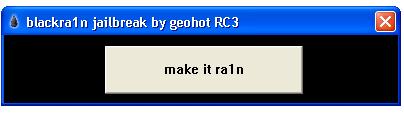

If you are a loyal blackra1n user who kept the blackra1n.app on your iPhone, run it. You will see Icy replaced by an option “ra1n”. Install this to upgrade your app. After upgrading, run blackra1n.app again. You will see “sn0w”. Install this, and enjoy your unlocked iPhone.Update: If you’ve previously used Blackra1n but uninstalled it or you’ve used Pwnage tool/Redsn0w to unlock, then you’ll need to install Blacksn0w using Cydia. Use http://blackra1n.com/ as repo.
For iPhone 2G
It works for iPhone 2G too. Follow steps 1-3 above. At step 4, there won’t be any “sn0w” option. Just tap Cydia and/or Rock at this step. Rest of steps remains same.
If you are having any problem or query regarding Blackra1n, Blacksn0w, Jailbreak or any other query, Please ask them in comments. I’ll be glad to help you out
Update: A real fix for WiFi issues (not the usual “Reset Network Settings”) See here: iPhone 3.1.2 Blacksn0w WiFi Fix
VIA Source
BlackBerry Desktop and Device Software Download Sites
If you did not purchase your BlackBerry® smartphone directly from Research In Motion (RIM), please select the link to your service provider below to download the BlackBerry® Desktop Software and BlackBerry® Device Software that your service provider has authorized for use with your device.
Africa
Asia Pacific
Europe
Latin America/South America
Middle East
North America
Furious gold unlocker - Warning 00000008, Warning 00000004 "Forbidden service is running.."
If you are using Hamachi or any other packet sniffers... USB over ip type of products... Uninstall them and Furious gold will work normally again...